
Basic internet browser features
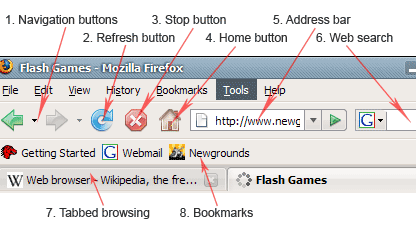
1. Navigation buttons
Refresh button is used to go back and forward while browsing. If you are in a home page of some site, then you go to contact page – Back button would bring you back to the home page, if then you would click forward button it would bring you again to the contact page. A small arrow next to navigation buttons brings up a quick list of all back/forward web pages available.
2. Refresh button
Refresh buttons is used to force web browser to reload webpage. Most major web browsers use caching mechanism (store local copies of visited pages to speed up performance) that sometimes prevents seeing the most updated information; by clicking refresh, latest version of the page is forcefully reloaded.
3. Stop button
Cancels web browser's communication with a server and stops page loading. Very useful to stop malicious sites from loading if accidentally entered.
4. Home button
Loads predefined home page. You can select any page as browser's home by clicking on tools menu and selecting options.
5. Web browser's address bar
Address bar is used to enter website and page names. Address bar works as a dropdown menu showing all previously visited sites. At the end of address bar you will find go button, that is not very useful as by simply clicking enter (after typing or selecting a domain name) you will be directed to the site.
6. Integrated search
Integrated search engine tool is relatively new feature in web browsers. It allows selecting your favorite search engine and doing a quick search by typing in a search term.
7. Tabbed browsing
Browser tabs allow opening many websites on a single web browser's window - very helpful when reading several websites at the same time. I.e. if you want to open several links from a website without losing it, you can right click on each link you want to see, and select open in a new tab option.
8. Bookmark buttons
Custom user defined buttons that redirect to chosen websites - Very useful to configure web mail and other often visited sites. Check Mozilla Firefox browser for live bookmarking.
Post a comment
Here you can share your thoughts with us by posting a question/comment. Your e-mail will not be shown to protect your privacy. Required fields are marked with *
Related Web pages
Check other Smooth Step articles related to browsers and firefox.
Popular web browsers
Netscape navigator once was one of most popular web browsers.
Firefox browser
Firefox team is constantly working on known security flaws offering one of the safest browsers available.
Web browsers
Modern browsers provide an environment to perform many complicated tasks such as audio/video streaming, web based software, interactivity etc.
Content manager
Smooth Step team dedicated large amount of time to make CMS fully compatible with major web browsers: Internet Explorer (version 6, 7 and 8), Mozilla Firefox, Safari and Google Chrome.